Our top-tier consultancy services provide strategic guidance to elevate your entire digital presence.
Learn More


 husna
|
November 6, 2026
|
Blog
Contents
You spent weeks reviewing draft designs, tweaking paragraphs, picking brand colours, and finally hit that big Publish button.You pop a small celebration, send the link to your family group chat, and wait for Google to do its magic. A few days later,you type your business name or your services into Google… and crickets. Your site is nowhere to be found. Here is the honest truth most people won’t tell you: search engines do not automatically know your website exists just because you launched it. Google doesn’t sit around waiting for new websites to pop up.If you dont connect the right cables behind the scenes, your brand-new website is like opening a gorgeous café in the middle of a dense jungle without putting up a single road sign. If you are a business owner just dipping your toes into the world of search optimisation (we previously explored what SEO is and why it matters), do not worry.
You do not need an engineering degree to get your foundations right.
Here is the step-by-step checklist of what you actually need to do right after your site goes live.
1. Open your browser and go to yourdomain.com/robots.txt.
2. Look at what is written on the screen.
3. If you see:
User-agent: *
Disallow: /
That single slash / literally tells all search engines: “Do not look at anything on this website” If you see that, text your web developer right away and ask them to change it so crawlers are allowed in. If your website runs on WordPress, go into Settings > Reading and verify that the checkbox for “Discourage search engines from indexing this site” is unchecked.
Google Search Console (GSC) is a 100% free tool provided by Google. Think of it as a direct hotline between your website and Google. It tells you which search queries people use to find you, what pages are indexed, and whether Google has trouble reading your site.
1. Head over to Google Search Console and sign in.
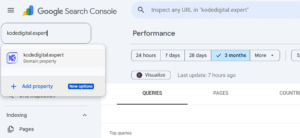
2. Click the property dropdown in the top-left corner and click + Add property.
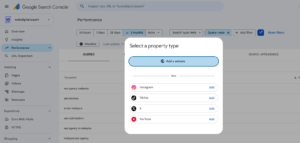
3. Select Add a website on the pop-up modal.
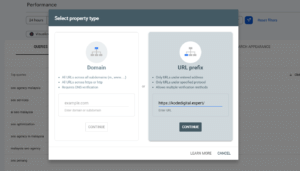
4. Google will give you two property options: Domain or URL prefix.
Once verified, paste your homepage link into the inspection search bar at the very top of Search Console and click Request Indexing. This acts like knocking on Google’s door to let them know your business is open.
Think of Google’s crawler like a courier driver trying to deliver packages to every room in a giant office building. If you do not provide a floor directory, they might only walk into the lobby and miss the product pages you actually want to sell.
That floor directory is your XML sitemap.
Most modern CMS platforms generate this automatically (typically found at yourdomain.com/sitemap_index.xml or yourdomain.com/sitemap.xml).
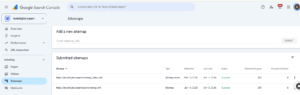
Within a day or two, check back to confirm that the status displays a clean green Success alongside the total count of discovered web pages.
Every new website owner does this: you set up Google Analytics 4 (GA4), open your dashboard every evening, and smile because you see 15 to 20 visits every day.
“People are visiting! The site is working!”
Then you realise: you refreshed the home page 8 times, your designer was testing buttons, your partner read your about page, and your sales rep checked the contact form. Out of those 20 visits, zero were actual customers.
If you don’t filter out your own traffic, your analytics data will be skewed, and you’ll make marketing decisions based on ghost numbers.
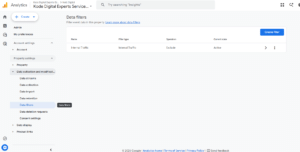
Once saved, GA4 ignores visits coming from your own devices. When you see your traffic climb after this, you know it represents genuine prospective buyers.
Google Search Console tells you how you are currently performing on Google, but it will not show you what your competitors are doing or where you rank day-to-day for your dream terms.
Connecting your site on day one establishes your baseline so you know if your content marketing is actually moving the needle.
Business owners frequently ask: “Can my developer just handle all the SEO, or do I need a specialist?”
Think of the relationship like building a physical retail storefront:
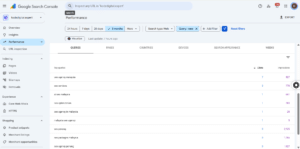
Once your technical setup is complete, the real growth engine begins: creating helpful, original content that targets commercial search terms. In Malaysia, search demand for professional digital visibility continues to climb steadily. Queries like seo agency malaysia, seo services, ai seo malaysia, and localised searches like seo penang demonstrate strong intent.
Modern search algorithms reward E-E-A-T (Experience, Expertise, Authoritativeness, and Trustworthiness). You cannot win rankings simply by publishing repetitive, robotic text. You need sharp visuals, practical insights, and well-managed execution.
As your marketing gains traction, two operational realities will emerge:
Google does not automatically discover every new website the moment it goes live. Search crawlers must be invited via Google Search Console and XML sitemap submissions. Furthermore, many developers accidentally leave “noindex” tags or Disallow instructions in the robots.txt file active from the staging phase.
No. Google evaluates websites on crawlability, indexability, user experience, and content helpfulness (E-E-A-T), not on whether the code was written by an AI tool or hand-crafted by a developer. The foundational technical setup remains identical for both.
Domain verification covers all variations of your site (including www, non-www, http, https, and subdomains) using a single DNS TXT record. URL prefix verification only tracks one specific URL string and requires tag or file-based verification.
Filtering internal IP traffic prevents your own team’s page views, clicks, and testing sessions from polluting your marketing data. Without this filter, you risk making business decisions based on artificial traffic numbers.
Business owners can easily handle basic setups like Google Search Console, sitemap submission, and GA4 filters using intuitive dashboards. However, collaborating with web developers for site speed or partnering with an SEO specialist for keyword strategy ensures you dominate competitive search results.
Executing this post-launch checklist prevents costly tracking errors and ensures search crawlers understand your site from day one.
If you want an experienced team to manage your technical audits, keyword rankings, and organic acquisition roadmap from start to finish, explore our comprehensive SEO Services or speak directly with our Penang SEO and digital marketing specialists. We work closely with growing companies across Penang, the Klang Valley, and nationwide to build digital engines that turn search traffic into loyal clients.
About the Author: Husna writes about business systems, compliance and digital transformation for Kode Digital.
Kode Digital Sdn Bhd is a Malaysian digital agency with offices in George Town, Penang and Petaling Jaya, Selangor. It builds Kunos, an AI-powered business operating system for Malaysian organisations.
353-3 Jalan C. Y. Choy,
10300 George Town,
Penang, Malaysia.
A-16-8 Tropicana Avenue,
No 12 Persiaran
Tropicana, PJU 3, 47410
Petaling Jaya, Selangor.




















 Singapore
 Australia